How to Create a Cricket API Key and Integrate Live Cricket Data into Your Website or App
Building a cricket website, mobile application, live-score platform or sports dashboard becomes much easier when your application can fetch structured cricket data through an API.
CricSportsAPI allows developers to connect their applications with cricket data using simple HTTP API requests.
In this guide, you will learn the complete process from creating an account and generating an API key to making your first request and displaying cricket data inside your website or application.
What Is a Cricket API Key?
An API key is a unique credential associated with your CricSportsAPI account.
Your application sends this key with API requests so that the server can identify your account and verify that you are authorized to access the requested cricket data.
Think of the API key as a private access key between your application and CricSportsAPI.
Your API key can be used to access supported cricket data such as:
Live cricket matches
Upcoming fixtures
Completed matches
Match details
Cricket scorecards
Series information
Team information
Player information
Cricket statistics
Match status
Other supported cricket endpoints
The exact data available depends on the API endpoints and plan enabled for your account.
Step 1: Create Your CricSportsAPI Account
The first step is to create an account on CricSportsAPI.
Visit the CricSportsAPI website and register using your email address and required account information.
After registration, log in to your dashboard.
Your dashboard is the main area where you can manage your API access, subscription, usage and API credentials.
Step 2: Choose an API Plan
Before making API requests, choose a plan according to the amount of cricket data and API usage required by your project.
Different applications can have very different traffic requirements.
For example, a personal cricket project may require relatively few API requests, while a large live-score website may need significantly higher usage limits.
When selecting your plan, consider:
Expected website traffic
Number of API requests
Live match refresh frequency
Number of applications using the API
Development and production requirements
API request limits
Once your selected plan is active, API access can be used according to the limits available on your account.
Step 3: Generate or Copy Your API Key
After your account and API access are active, open your CricSportsAPI dashboard.
Navigate to the section where your API key or API credentials are displayed.
Copy the API key associated with your account.
A key may look conceptually similar to this:
YOUR_API_KEYNever publish your real API key inside tutorials, public GitHub repositories, browser screenshots or public source code.
Your API key should be treated like a password.
Step 4: Understand How an API Request Works
Most cricket API integrations follow a simple flow:
Your Website / App
        ↓
API Request
        ↓
CricSportsAPI
        ↓
JSON Response
        ↓
Your Backend
        ↓
Website / Mobile App UI
Your application sends an HTTP request to a CricSportsAPI endpoint.
The API processes that request and returns structured data, normally in JSON format.
Your application then reads that JSON response and displays the required information to users.
Step 5: Make Your First API Request
Suppose you want to request cricket match data.
A typical request contains:
API endpoint
API key
Optional filters or parameters
Conceptually, the request looks like this:
https://your-api-endpoint.com/matchesThe API key must be supplied using the authentication format documented for the endpoint.
For example, an API may accept a key through a request header:
X-API-Key: YOUR_API_KEYOr through another authentication format specified in the CricSportsAPI documentation.
Always follow the authentication method shown in the documentation for the endpoint you are using.
Example API Response
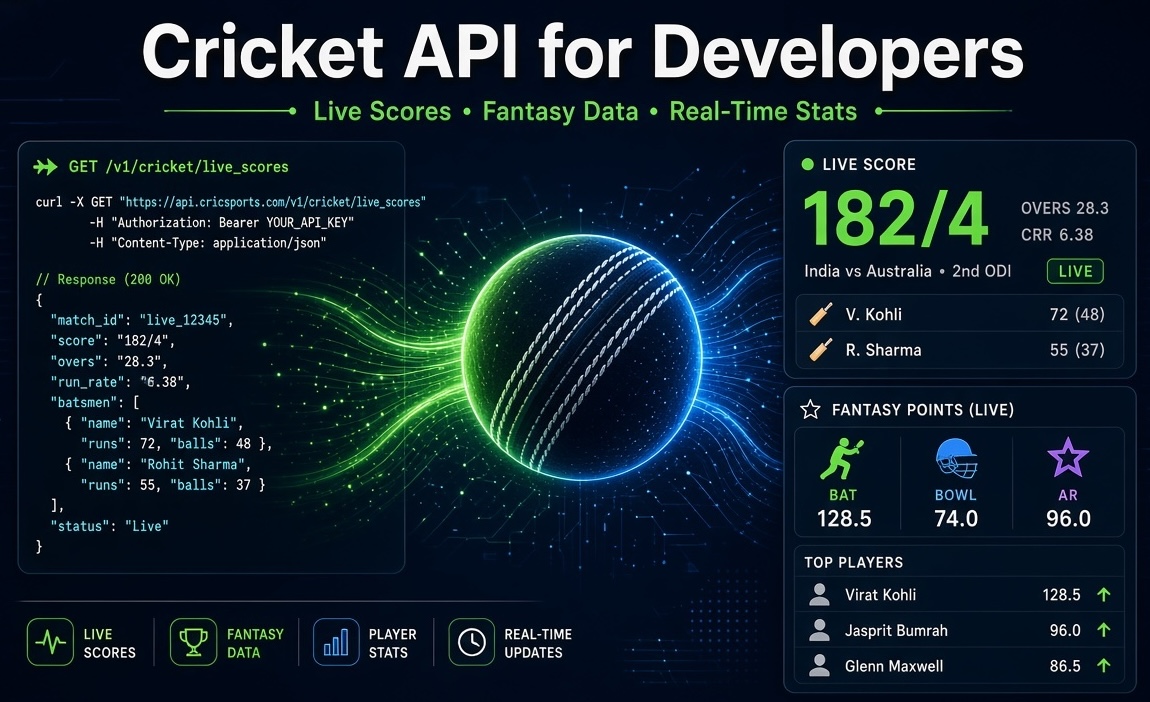
A cricket API response may look conceptually like this:
{
  "success": true,
  "data": [
    {
      "match_id": 12345,
      "team_a": "Team A",
      "team_b": "Team B",
      "status": "Live",
      "venue": "Cricket Stadium"
    }
  ]
}
The actual response structure depends on the endpoint.
Your application can read fields from this JSON and use them to build match cards, scoreboards, schedules or statistics pages.
Integrating CricSportsAPI with PHP
PHP developers can call the API using cURL.
Example:
<?php

$apiKey = 'YOUR_API_KEY';

$url = 'YOUR_CRICSPORTSAPI_ENDPOINT';

$ch = curl_init();

curl_setopt_array($ch, [
    CURLOPT_URL => $url,
    CURLOPT_RETURNTRANSFER => true,
    CURLOPT_TIMEOUT => 20,

    CURLOPT_HTTPHEADER => [
        'Accept: application/json',
        'X-API-Key: ' . $apiKey
    ]
]);

$response = curl_exec($ch);

if ($response === false) {
    die('API request failed: ' . curl_error($ch));
}

curl_close($ch);

$data = json_decode($response, true);

print_r($data);
Replace:
YOUR_API_KEYwith your API key and:
YOUR_CRICSPORTSAPI_ENDPOINTwith the endpoint shown in your API documentation.
If your endpoint uses a different API-key header or authentication format, update the request accordingly.
Displaying Cricket Data with PHP
After decoding the JSON response, you can display the information on your website.
Example:
<?php

if (!empty($data['data'])) {

    foreach ($data['data'] as $match) {

        echo '<div class="match-card">';

        echo '<h3>'
            . htmlspecialchars($match['team_a'] ?? '')
            . ' vs '
            . htmlspecialchars($match['team_b'] ?? '')
            . '</h3>';

        echo '<p>Status: '
            . htmlspecialchars($match['status'] ?? '')
            . '</p>';

        echo '</div>';
    }
}
This is only a basic example.
You can use the API response to create a much more advanced cricket interface.
Integrating the Cricket API with JavaScript
JavaScript applications can use fetch() to request API data.
For example:
fetch("YOUR_CRICSPORTSAPI_ENDPOINT", {
    headers: {
        "Accept": "application/json",
        "X-API-Key": "YOUR_API_KEY"
    }
})
.then(response => response.json())
.then(data => {
    console.log(data);
})
.catch(error => {
    console.error("API Error:", error);
});
However, you should normally avoid exposing a private API key directly in browser-side JavaScript.
A safer architecture is:
Browser
   ↓
Your Backend
   ↓
CricSportsAPI
   ↓
Your Backend
   ↓
Browser
Your backend keeps the API key private and sends only the required cricket data to your frontend.
Node.js Example
Node.js developers can request API data using fetch.
const apiKey = process.env.CRICKET_API_KEY;

async function getMatches() {

    const response = await fetch(
        "YOUR_CRICSPORTSAPI_ENDPOINT",
        {
            headers: {
                "Accept": "application/json",
                "X-API-Key": apiKey
            }
        }
    );

    if (!response.ok) {
        throw new Error(
            `API request failed: ${response.status}`
        );
    }

    return await response.json();
}

getMatches()
    .then(data => console.log(data))
    .catch(error => console.error(error));
Store your API key in environment variables rather than directly inside your source code.
For example:
CRICKET_API_KEY=YOUR_API_KEYIntegrating CricSportsAPI with React
React applications should ideally request cricket data through your backend rather than contacting the cricket API directly with a private API key.
Your React frontend can call your own backend:
useEffect(() => {

    fetch("/api/matches")
        .then(response => response.json())
        .then(data => {
            setMatches(data);
        })
        .catch(error => {
            console.error(error);
        });

}, []);
Your backend then communicates with CricSportsAPI securely.
This keeps your API key hidden from visitors.
Building a Live Cricket Score Page
Once your API integration is working, you can build a live cricket match page.
A typical live match interface may display:
Team names
Team logos
Current score
Wickets
Overs
Match status
Current innings
Batting information
Bowling information
Venue
Series
Match time
Result
The frontend design is completely controlled by your application.
CricSportsAPI provides structured data, while your application decides how that data should look to users.
Building an Upcoming Matches Page
You can also use cricket fixture data to create an upcoming matches page.
For example:
India vs Australia
10 October 2026
7:00 PM

England vs South Africa
11 October 2026
3:30 PM
Your application can group matches by:
Date
Series
Match type
Tournament
Team
Match status
This is useful for cricket schedules, tournament websites and sports applications.
Building a Cricket Scorecard
Scorecard data can be used to create detailed match pages.
Depending on the data returned by your endpoint, a scorecard can contain:
Batting score
Runs
Balls faced
Strike rate
Fours
Sixes
Bowling figures
Overs
Maidens
Runs conceded
Wickets
Economy
Partnerships
Innings totals
Your application reads these fields from the API response and converts them into tables or cards.
Store Your API Key Securely
Never store your production API key directly inside publicly accessible JavaScript.
Avoid this:
const apiKey = "MY_REAL_API_KEY";Anyone opening your website's developer tools could potentially see it.
Instead, keep API credentials on your server.
For PHP applications, configuration can be stored outside the public code or in server environment variables.
Example:
CRICKET_API_KEY=your_private_api_keyThen access it on the server:
$apiKey = getenv('CRICKET_API_KEY');Do Not Upload Your API Key to GitHub
Before pushing a project to GitHub or another public repository, ensure that your API credentials are excluded.
For example, you can place environment files inside .gitignore:
.envNever commit a real production API key.
If an API key is accidentally exposed publicly, generate or rotate the credential where supported before continuing to use the application.
Handling API Errors
Your application should never assume every API request will succeed.
Possible problems may include:
Invalid API key
Expired API access
Request limit reached
Incorrect endpoint
Invalid parameters
Temporary server error
Network timeout
A production application should handle these conditions gracefully.
Example:
if (!isset($data['success']) || $data['success'] !== true) {

    echo 'Unable to load cricket data at the moment';

}
Do not show raw server errors or sensitive debugging information to public website users.
Use Caching for Better Performance
If hundreds or thousands of visitors open the same match page, requesting the same API data separately for every visitor can create unnecessary API traffic.
A better architecture is:
CricSportsAPI
      ↓
Your Server
      ↓
Cache
      ↓
Thousands of Visitors
Your application can fetch data once, cache it for an appropriate period and serve the cached response to multiple visitors.
For rapidly changing live data, use shorter cache intervals.
For relatively stable information such as completed matches, teams or historical data, longer cache intervals may be suitable.
Respect API Rate Limits
Your CricSportsAPI plan may have request or usage limits.
Avoid creating loops that send unnecessary API requests.
For example, do not refresh an endpoint every second unless your plan and the endpoint are designed for that usage pattern.
Instead, decide refresh frequency based on:
Type of data
Whether a match is live
Expected traffic
API limits
User experience requirements
Recommended Production Architecture
For a professional cricket application, a useful architecture is:
CricSportsAPI
      ↓
Backend API Service
      ↓
Cache / Database
      ↓
Your Website or App
This gives you more control over:
API-key security
Caching
Rate limiting
Error handling
Response formatting
Application performance
What Can You Build with a Cricket API?
Once the integration is complete, you can use cricket data to build many different products.
Examples include:
Live cricket score websites
Cricket mobile apps
Tournament websites
Match centers
Fantasy cricket supporting interfaces
Cricket statistics websites
Team pages
Player profiles
Fixtures and schedules
Scorecards
Sports dashboards
Cricket analytics applications
The same API can power multiple parts of your cricket platform.
Complete Integration Flow
The complete process can be summarized as:
1. Create CricSportsAPI account
        ↓
2. Activate an API plan
        ↓
3. Get your API key
        ↓
4. Select an endpoint
        ↓
5. Send API request
        ↓
6. Receive JSON data
        ↓
7. Parse the response
        ↓
8. Cache data where appropriate
        ↓
9. Display data in your UI
        ↓
10. Monitor API usageFrequently Asked Questions
Find quick answers to the most common questions about this topic.
Developer-focused cricket data context
This article is part of the CricSportsAPI knowledge base covering live match data, fixtures, scorecards, series, teams, players and cricket statistics for websites, apps and sports platforms.